

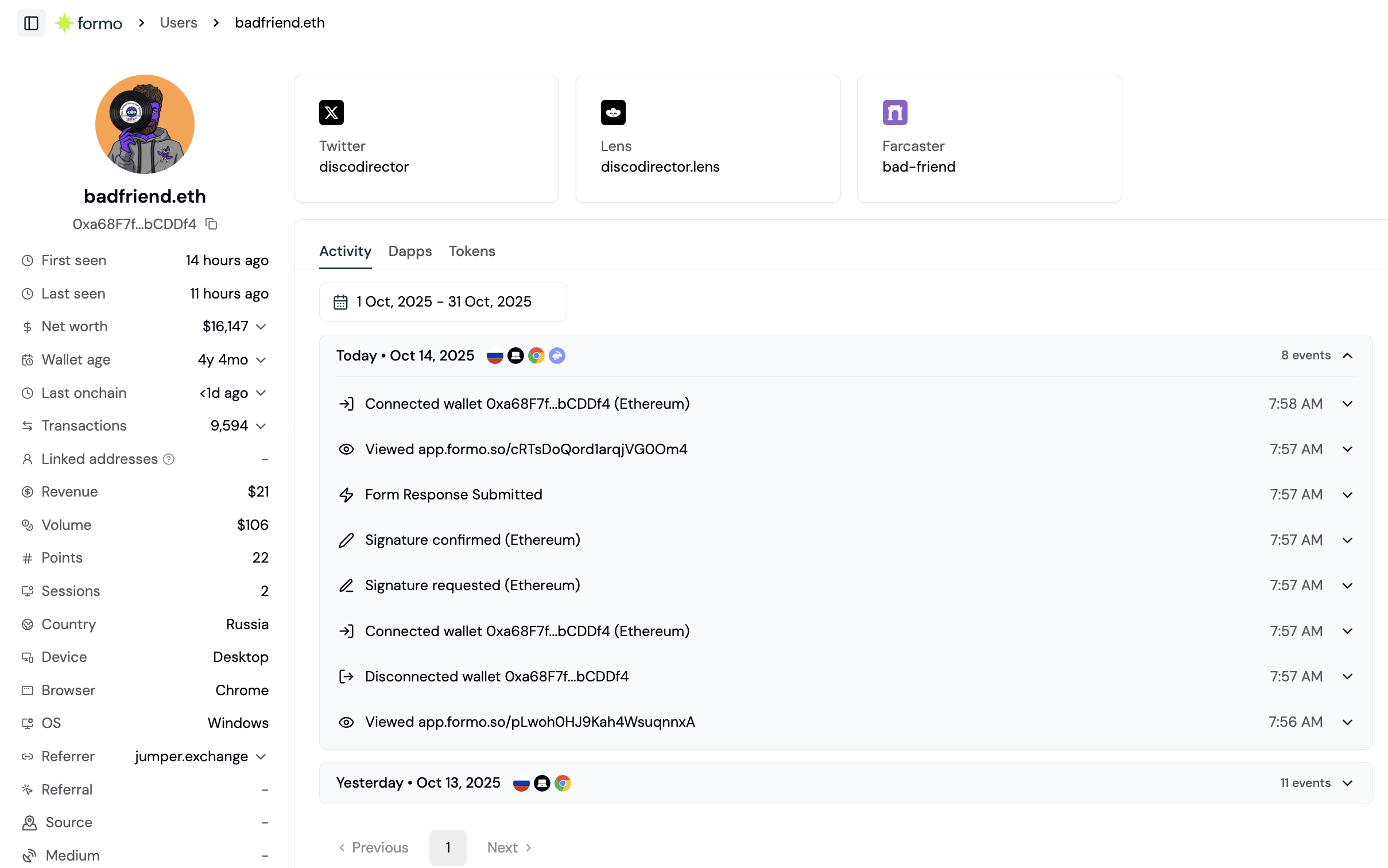
View a user's DeFi positions and token balances across multiple chains.
- Wallet address, ENS profile, net worth, and transaction frequency
- Real-time feed of what each user is doing on your crypto app, with full attribution through referrers and UTM sources
- DeFi positions and token balances of the user across multiple chains
- Linked wallet addresses
- Social profiles
- Onchain attestations
- Wallet labels
- Volume, revenue, and points on your app
User Lifecycle
Each user’s lifecycle stage is computed relative to a reference date (the end of the queried date range, which defaults to today). The default thresholds are shown below; projects can override them in Settings → Lifecycle.
Stages are mutually exclusive and evaluated in precedence order: Churned, New, Power user, Resurrected, At Risk, Returning. At Risk carves out fading users that would otherwise sit in Returning, surfacing established wallets to re-engage before they churn.
Filter users by lifecycle to create segments and audiences. For example, “Show me whales who use app X who are power users” or “Show me high net worth wallets who are at risk.”
User Wallet Metadata
Each wallet profile includes key metadata aggregated across all chains:User Socials
View social accounts linked to a wallet address. Formo resolves onchain identities and social profiles from multiple sources including ENS, Web3Bio, and more. Supported platforms:
Social cards are displayed in a grid on the wallet profile page. Click any card to copy the handle or open the external profile.
User Apps
The Apps tab shows a user’s complete DeFi positions and portfolio across all major chains. See which protocols a user is active in and the USD value of their positions.
Filter by individual chain or view all positions at once. Apps are sorted by USD value from highest to lowest.
User Tokens
The Tokens tab shows token balances held by the wallet across all major chains.
Filter by individual chain or view all tokens at once. Tokens are sorted by USD value from highest to lowest.
User Attribution
Track how each user discovered and arrived at your app. Formo captures both first-touch and last-touch attribution for every user.
All UTM parameters track both first-touch and last-touch values, so you can see how a user originally found your app and what brought them back most recently.
User Activity
View users’ active days at a glance with the activity chart. Activity charts are available on wallet profile and anonymous profile pages, showing engagement patterns over time.Let us know what you’d like to know about your onchain users. Message us via email.
How to research individual users
Wallet profiles let you drill into specific users to understand their behavior, investigate issues, or identify opportunities. This guide shows you how.Step 1: Find a user
There are several ways to access wallet profiles: From the Users list:- Go to Users in the left navigation
- Click any wallet address to open their profile
- Go to Activity
- Click on any event
- Click the wallet address to open their profile
- Use the search bar at the top of the dashboard
- Enter a wallet address or ENS name
- Click to open the profile
Step 2: Understand the profile overview
The profile header shows key information at a glance:
Any auto-generated labels (verifications, campaign participation, agent detection) appear as badges next to the wallet’s name. See the full list of labels for details.
Step 3: Review the activity timeline
The Activity tab shows everything this user has done on your app:- Page views with URLs
- Wallet connects/disconnects
- Transactions with status
- Custom events you’ve tracked
- Timestamp
- Event type and details
- Referrer/UTM attribution (how they arrived)
- Device and location
Step 4: Explore onchain data
The Apps and Tokens tabs show the user’s onchain footprint: Apps tab (DeFi positions):- Active positions in protocols (Aave, Uniswap, etc.) across supported chains
- USD value and portfolio percentage for each position
- Useful for understanding which crypto apps the wallet interacts with
- All tokens held across supported chains
- Token amounts, USD values, and portfolio percentages
Step 5: Check properties and custom labels
The Properties tab shows:- Editable user properties: display name, user ID, email, socials, ENS/Basenames/Linea, website, location
- Custom user labels you or your team have added, separate from the auto-generated labels shown in Step 2
Common use cases
Customer support:- User reports an issue
- Find their profile by wallet address
- Review activity timeline to see what happened
- Check transaction status and error details
- Identify high-value users (filter by net worth)
- Review their onchain activity
- Find social profiles for outreach
- Understand their other app usage
- Find power users in your segments
- Study their activity patterns
- Identify features they use most
- Discover unmet needs from their other app usage
- Flag suspicious activity in alerts
- Open the user’s profile
- Check wallet age, transaction patterns
- Review linked wallets and labels